Networks
An Overview
In simple terms, a network is any group of two or more nodes that are connected in some way. Building on this concept, it can be said that Computer Networks are any group of two or more computers that share a physical connection. This physical connection only becomes useful when it is used by the attached computers to communicate with each other. The attached computers need to be able to understand each other in the communication. To that end, they use commonly defined protocols to send information to each other in the form of streams of electrons over that physical connection.
Whether discussing small home networks, larger business networks, or even the largest network of them all, the Internet, the same basic principles make all of them work. Every computer on a network is physically connected to every other computer on a network, often via various intermediary computers or other networking hardware. Every computer network has a list of defined protocols that allow the computers to understand each other. By the end of this article, the reader should be able to:
-
Identify Physical Connections between computers
-
Describe the purpose of network protocols
- Define basic network hardware components:
- Routers
- Switches
- Access Points
- Firewalls
- Differentiate between different network types:
- Local Area Networks
- Wide Area Networks
- Describe basic computer networks
Physical Connections
Computers can be connected to each other in, essentially, two primary ways: Cables, and Radio Waves. The most easily understood as a physical connection is a network cable. This is a physical length of wire that is plugged in between a computer and either another computer, or a piece of network hardware. However, radio waves are also physical connections (albeit ones that cannot be seen). These are actually more common than cables, and form the basis for how cell phones and Wi-Fi networks allow for communication between two or more computers or devices. An important fact about the physics of computers is that everything computers does can be broken down to moving electrons. This physical connection between devices is crucial, as it allows for electrons to be exchanged between the devices.
For a particularly mind-boggling example of this: Any time a user’s computer connects to any server in the world, there is an unbroken physical chain between the two.
Network Hardware
A network is made of components all physically connected to each other. In addition to the computers and other devices on the network (such as printers, game consols, phones, tablets, and even refrigerators, for some reason), there is hardware that facilitates the communication between the devices. There are 3 main pieces of network hardware that will need to be discussed for the purposes of this series.
Routers
Perhaps the most important piece of networking equipment discussed in this series, the router allows for two networks to communcate with each other. In small networks, there is often only one router that allows the local network to communicate with the internet. This is commonly the case in home networks. These devices route traffic from one network to another, and help ensure that the traffic gets to its ultimate destination.
Switches
Switches often sit behind routers and allow for the devices on the network to communicate with each other locally. A switch is only able to move traffic between devices physically connected to the same switch. Local networks can be made using only switches and the devices connected to them, however for the network to communicate with devices on a different network, they send the traffic to a router.
Access Points
For the purposes of this series, Access Points refers to Wireless Access Points (WAPs). WAPs are radio devices that allow for computers to communicate with routers and switches by radio communication. When using a WAP the physical connection is the radio waves themselves. Many consumer-grade (read: home use) routers have WAPs built in. These combined devices are often called “Wireless routers.”
Firewalls
Firewalls are a special kind of router that looks at the traffic it is routing and decides, based on a set of user-defined rules, where to send the traffic or whether to allow the traffic through at all. These special security devices will be addressed in an article all their own later on.
These four devices are enough to describe almost every network at an abstract level. Even the internet is mostly made of these devices.
Types of Networks
There are many ways of describing networks. These ways can be insanely complex (advanced network topologies), or relatively simple (Network Classifications). This article will cover two common network classifications to allow for ease of describing later topics. It is outside the scope of this guide to provide substantial information in network taxonomies.
Local Area Networks
A Local Area Network (LAN) is defined as being in one physical location. Home networks and some very simple small business networks can be defined as being individual LANs. These networks allow the devices on them to communicate, and will require a router to communicate with other networks (such as the internet, or other sites of a business).
Wide Area Networks
A Wide Area Network (WAN) is the opposite of a LAN. It is made of a network that is geographically spread out. Often WANs are internetworks or networks made of other networks. The Internet is an example of a WAN.
Basic Computer Networks
The simplest computer network is two computers connected directly to each other with a cable that allows for direct transmission.

Fig 01 - A simple computer network
In the network in Figure 1, Bob and Alice can communicate with each other using a defined network protocol. Network protocols will be covered in more detail in a later article, but at a basic level a network protocol is a defined set of rules for the transfer of information between two computers. For example, if Bob sends the message “GET index.html” to Alice’s computer, Alice’s computer will know to send the file “index.html” to Bob’s computer.
This 2-computer network is a good example, but it is not overly practical to have a network of only two computers. A home network is a more common example that most readers will be familiar with.
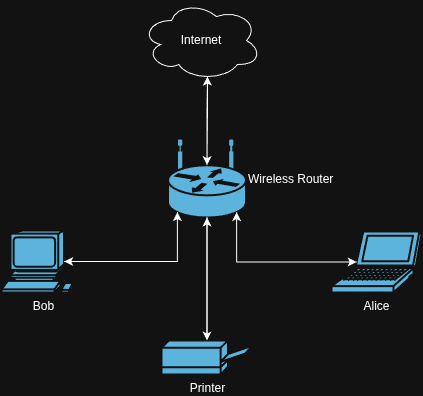
Fig 02 - A common home network
Figure 2 is an example of a common home network. In this example a few devices are connected to a single wireless router. All of these devices can communicate with each other, and the internet beyond the router. Bob and Alice can share memes with each other, and print off documents when needed. Some home networks will also include smart TVs, game consoles, phones, tablets, and other devices all connected to the same wireless router. In this network, the router is acting as both the router, routing traffic between the home network and the internet, and the switch, switching traffic between the devices on the same network. In most cases, consumer-grade wireless routers also contain some (limited) Firewall functionality to prevent traffic from the internet reaching the devices on the home network.
In most respects, a home network is not much different from a small-business network. They often include a single router, maybe a switch, and some devices that can communicate with each other and the internet. As an organization or a network grow, however, they are likely to open a second office, have a different office on another floor, or maybe have the need to have two different networks in their organization for security reasons. In this case, two networks will need to be connected into an internetwork. If these two networks are in different offices, it can constitute a WAN.
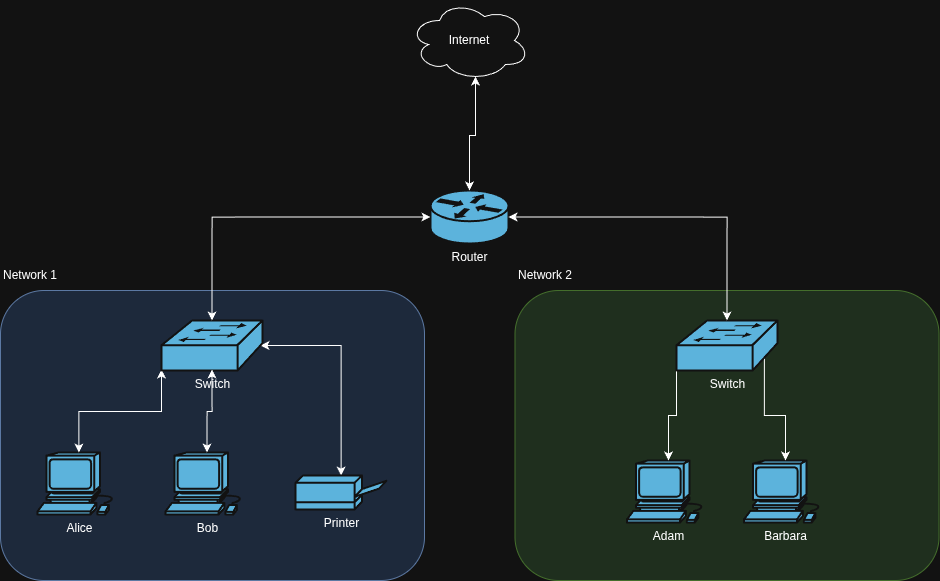
Fig 03 - A simplified small business (inter)network
In the network displayed in Figure 3, two smaller networks are connected by a common router. This would allow Adam and Barbara in Network 2 to be able to communicate with Alice, Bob, and the Printer in Network 1 via the common router. Both networks 1 and 2 are able to communicate with the internet via the common router, as well. In this way, the organization could have two different offices all talking to each other by connecting the various networks together. If the offices were not physically located near each other, this would be a Wide Area Network (WAN).
From here it is all pretty much expansions of the same. If one continues adding routers and servers, the internet can be modeled this same way, just with a substantial numbers of routers and other devices. In essence, the Internet is a giant meta network compromised of all of the networks connected to it.
Summary
Overall, networks can be described very simply. In this article, only the very basics of what a network is and how it is comprised were covered. In later articles various other network topics will be covered including how the communication on a network can be abstracted, how communication flows across a network, the various ways computers are addressed on networks, and various protocols used to communicate over networks.
If any questions remain, feel free to reach out to me a jaycee@starbase17.space or on any of my social media sites.